
 第10章:ALPC
# 第10章:ALPC(Advanced Local Procedure Calls)
Windows 拥有多种进程间通信机制(inter-process communication mechanisms),允许进程通过传递数据进行相互通信。例如窗口消息(window messages)、共享内存(shared memory)、管道(pipes)、邮槽(mailslots)和组件对象模型(COM)。高级(或异步)本地过程调用(Local Procedure Calls,ALPC)是另一种此类机制,Windows 组件使用它进行跨进程边界(process boundaries)的通信。与其他提到的机制不同,ALPC 完全没有官方文档说明。本章概述了 ALPC API 及其在进程间通信中的使用方法。
ALPC 是一个庞大的主题,我对它的研究尚未完成,因此本章并未涵盖 ALPC 的所有内容。本专栏的后续版本将涵盖更多 ALPC 相关内容。
本章包含以下内容:
• ALPC 概念
• 简单客户端/服务器
• 创建服务器端口
• 连接到端口
• 消息属性
• 发送和接收消息
# 10.1 ALPC 概念
ALPC 涉及消息的发送和接收。消息(message)是一种包含消息头(header)和正文(body)的数据结构。消息头包含有关消息的信息,例如消息大小、发送方(sender)和接收方(receiver)。
ALPC 中的核心实体是端口(Port)。端口是一个通信端点(communication endpoint),从概念上讲与网络端口(network ports)类似。它是一种名为 ALPC 端口(ALPC Port)的内核对象类型(kernel object type)。端口分为 3 种类型:
• 服务器连接端口(Server connection port)—— 一种命名端口(named port),用于监听传入的连接(incoming connections)。
• 服务器通信端口(Server communication port)—— 一种未命名端口(unnamed port),用于与客户端通信。
• 客户端端口(Client port)—— 一种未命名端口,客户端使用它与服务器通信。
由于服务器连接端口是命名的,因此可以通过 WinObj、Object Explorer、Process Explorer 等工具查看。图 10-1 显示了在 WinObj 中查看的 RPC Control 对象管理器目录(object manager directory)中的多个 ALPC 端口对象。
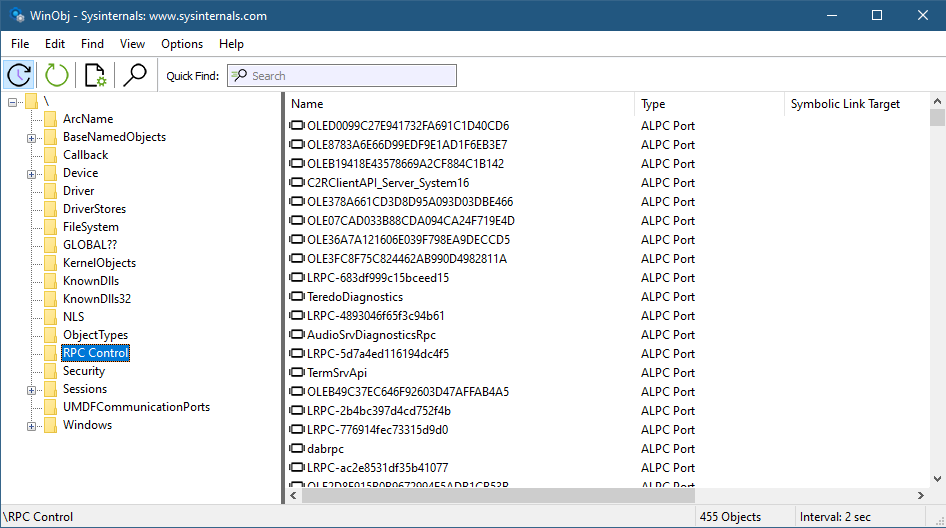
图 10-1:WinObj 中的 ALPC 端口
使用 Object Explorer,可以查看每个端口对象的句柄(handles)(图 10-2)。双击某个对象可查看其属性(properties)。

图 10-2:ObjExp 中的 ALPC 端口句柄
使用 Process Explorer 和 Object Explorer,可以检查特定进程中的 ALPC 端口句柄(图 10-3)。
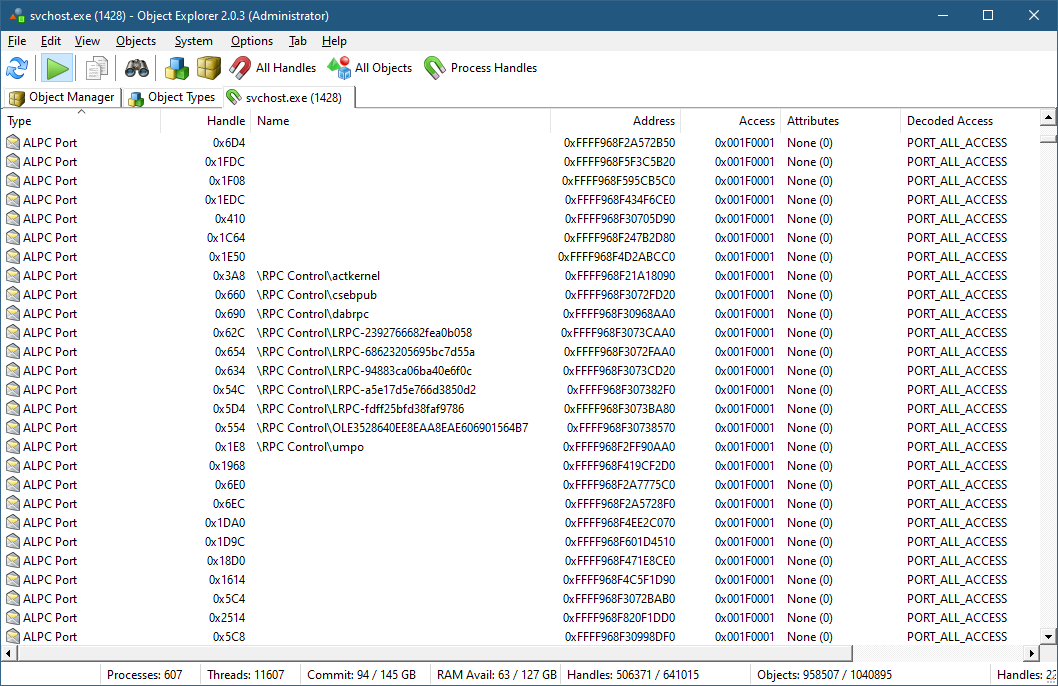
图 10-3:ObjExp 中的 ALPC 端口句柄
内核调试器(kernel debugger)可以提供有关 ALPC 端口、消息和连接的更多详细信息。例如,!alpc /lpp 命令加上进程地址,可以显示指定进程使用的所有 ALPC 端口:
lkd> !alpc /lpp ffff968f2ff62300
Ports created by the process ffff968f2ff62300:
ffff968f2ff90aa0('umpo') 0, 32 connections
ffff968f2ca9ed70 0 ->ffff968f306a2d70 0 ffff968f2ff130c0('services.exe')
ffff968f3094bb30 0 ->ffff968f30998df0 0 ffff968f2ff62300('svchost.exe')
ffff968f2c15bc60 0 ->ffff968f2c15ba00 0 ffff968f3143d080('svchost.exe')
ffff968f2c73e6e0 0 ->ffff968f2c73e070 0 ffff968f3150e080('svchost.exe')
ffff968f3534f070 0 ->ffff968f3534f530 0 ffff968f34f6e080('esif_uf.exe')
ffff968f2479add0 0 ->ffff968f243b6dd0 0 ffff968f3066c080('WUDFHost.exe')
ffff968f35fbe070 0 ->ffff968f354edce0 0 ffff968f423d0080('NVDisplay.Cont')
ffff968f45bee580 0 ->ffff968f351e4c30 0 ffff968f31260300('sihost.exe')
ffff968f24af4a80 0 ->ffff968f24af3ce0 0 ffff968f47af41c0('explorer.exe')
...
ffff968f21a18090('actkernel') 0, 19 connections
ffff968f30711de0 0 ->ffff968f3074edf0 0 ffff968f3074a340('svchost.exe')
ffff968f30736990 0 ->ffff968f30736730 0 ffff968f2ff62300('svchost.exe')
ffff968f30bbbdd0 0 ->ffff968f30b45a80 0 ffff968f30b11080('svchost.exe')
...
ffff968f307382f0('LRPC-a5e17d5e766d3850d2') 0, 5 connections
ffff968f243f9b80 0 ->ffff968f243f9de0 0 ffff968f31260300('sihost.exe')
ffff968f5d985510 0 ->ffff968f4bd482c0 0 ffff968f4f25e280('AcrobatNotific')
...
Ports the process ffff968f2ff62300 is connected to:
ffff968f2ff8cdf0 0 -> ffff968f2d1417e0 ('ApiPort') 0 ffff968f2cacd140 ('csrss.ex\
e')
ffff968f2ff51a80 0 -> ffff968f2ff6cd00 ('ntsvcs') 178 ffff968f2ff130c0 ('service\
s.exe')
ffff968f2ff4adc0 0 -> ffff968f02ea8070 ('PowerPort') 0 ffff968f02f02080 ('System\
')
ffff968f30730d90 0 -> ffff968f0a15f4a0 ('PdcPort') 0 ffff968f02f02080 ('System')
ffff968f217ce3a0 0 -> ffff968f2fef8c90 ('lsasspirpc') 0 ffff968f2ff55080 ('lsass\
.exe')
...
2
3
4
5
6
7
8
9
10
11
12
13
14
15
16
17
18
19
20
21
22
23
24
25
26
27
28
29
30
31
32
33
使用端口地址(上述输出左侧的第一个和第二个值)可以获取有关该端口的更多详细信息:
kd> !alpc /p ffff968f2a572b50
Port ffff968f2a572b50
Type : ALPC_CLIENT_COMMUNICATION_PORT
CommunicationInfo : ffffba0de0cd1460
ConnectionPort : ffff968f3072faa0 (LRPC-68623205695bc7d55a), Connections
ClientCommunicationPort : ffff968f2a572b50
ServerCommunicationPort : ffff968f30b09530
OwnerProcess : ffff968f2ff62300 (svchost.exe), Connections
SequenceNo : 0x00000004 (4)
CompletionPort : 0000000000000000
CompletionList : 0000000000000000
ConnectionPending : No
ConnectionRefused : No
Disconnected : No
Closed : No
FlushOnClose : Yes
ReturnExtendedInfo : No
Waitable : No
Chapter 10: ALPC 267
Security : Dynamic
Wow64CompletionList : No
Main queue is empty.
Direct message queue is empty.
Large message queue is empty.
Pending queue is empty.
Canceled queue is empty.
lkd> !alpc /p ffff968f93806a20
Port ffff968f93806a20
Type : ALPC_CONNECTION_PORT
CommunicationInfo : ffffba0f1e24c7b0
ConnectionPort : ffff968f93806a20 (OLE474475C7BFB330BCB066F923BC52), Co\
nnections
ClientCommunicationPort : 0000000000000000
ServerCommunicationPort : 0000000000000000
OwnerProcess : ffff968f61ae1080 (WhatsApp.exe), Connections
SequenceNo : 0x0000002A (42)
CompletionPort : ffff968fbc5bcf40
CompletionList : 0000000000000000
ConnectionPending : No
ConnectionRefused : No
Disconnected : No
Closed : No
FlushOnClose : Yes
ReturnExtendedInfo : No
Waitable : No
Security : Static
Wow64CompletionList : No
8 thread(s) are registered with port IO completion object:
THREAD ffff968f8923b040 Cid a0a4.1a3b8 Teb: 000000a170052000 Win32Thread: ffff\
968f9441f910 WAIT
THREAD ffff968f4d1e8080 Cid a0a4.1aa00 Teb: 000000a170056000 Win32Thread: ffff\
968fe1046be0 WAIT
THREAD ffff968f4eb61080 Cid a0a4.1235c Teb: 000000a17005a000 Win32Thread: ffff\
Chapter 10: ALPC 268
968fe1048580 WAIT
THREAD ffff968f4ee19080 Cid a0a4.c494 Teb: 000000a170060000 Win32Thread: 00000\
00000000000 WAIT
...
2
3
4
5
6
7
8
9
10
11
12
13
14
15
16
17
18
19
20
21
22
23
24
25
26
27
28
29
30
31
32
33
34
35
36
37
38
39
40
41
42
43
44
45
46
47
48
49
50
51
52
53
54
55
56
57
58
有关
!alpc命令的更多详细信息,请查看相关文档。
有关 ALPC 的更多信息,可以在《Windows 内部原理(Windows Internals)》第 7 版第 2 卷的第 8 章中找到。
# 10.2 简单客户端/服务器(Simple Client/Server)
首先,我们将使用ALPC(本地过程调用,Advanced Local Procedure Call)以同步模式(synchronous mode)构建客户端进程与服务器进程之间的简单通信。
服务器的操作步骤如下:
• 使用端口创建函数(NtAlpcCreatePort)创建一个命名服务器监听端口(named server listening port)。
• 使用发送等待接收端口函数(NtAlpcSendWaitReceivePort)等待通信请求。
• 收到连接请求后,使用连接端口接受函数(NtAlpcAcceptConnectPort)接受该请求。
• 继续通过发送等待接收端口函数(NtAlpcSendWaitReceivePort)等待通信请求,对每个到达的请求进行处理。这可能包括来自新客户端的新连接请求。
客户端进程的操作步骤如下:
• 使用端口连接函数(NtAlpcConnectPort)通过名称打开服务器端口。
• 使用发送等待接收端口函数(NtAlpcSendWaitReceivePort)向服务器发送请求。
我们先从客户端开始,因为它相对简单。第一步是通过名称连接到服务器端口。为了让示例更具实用性,客户端最多尝试10次连接,每次尝试之间间隔1秒:
HANDLE hPort = NULL;  // 初始化句柄,避免野指针
UNICODE_STRING portName;
RtlInitUnicodeString(&portName, L"\\RPC Control\\SimpleServerPort");
NTSTATUS status;

// 循环10次尝试连接ALPC端口
for (int i = 0; i < 10; i++)
{
    status = NtAlpcConnectPort(
        &hPort,
        &portName,
        nullptr,
        nullptr,
        ALPC_MSGFLG_SYNC_REQUEST,
        nullptr,
        nullptr,
        nullptr,
        nullptr,
        nullptr,
        nullptr);

    if (NT_SUCCESS(status))
    {
        break;  // 连接成功则退出循环
    }

    printf("NtAlpcConnectPort failed: 0x%X\n", status);
    Delay(1);
}

// 检查最终连接状态
if (!NT_SUCCESS(status))
{
    return status;
}

printf("Client port connected: 0x%p\n", hPort);
2
3
4
5
6
7
8
9
10
11
12
13
14
15
16
17
18
19
20
21
22
23
24
25
26
27
28
29
30
31
32
33
34
35
36
37
端口连接函数(NtAlpcConnectPort)用于连接到名称为\\RPC Control\\SimpleServerPort的服务器——我们的服务器在注册端口时会使用该名称。并不要求必须使用“RPC Control”对象管理器目录(object manager directory),但它是一个不错的选择。同步请求标志(ALPC_MSGFLG_SYNC_REQUEST)表示客户端希望向服务器发送同步请求。该函数会在hPort中返回服务器端口的句柄(handle)。
我们将在下一节详细介绍所有参数。
延迟函数(Delay)是一个简单的函数,用于按指定的秒数休眠:
void  Delay(int  seconds)  {
    LARGE_INTEGER  time;
    time.QuadPart  =  -10000000LL  *  seconds;
    NtDelayExecution(FALSE,  &time);
}
2
3
4
5
假设连接成功,客户端现在可以向服务器发送请求了。该客户端会在一个无限循环中每秒发送一条包含当前时间的字符串,直到发送失败。每个ALPC消息都必须以端口消息结构(PORT_MESSAGE)开头。我们将创建一个简单的结构,在该结构的基础上扩展一些文本内容:
struct Message : PORT_MESSAGE
{
    char Text[64];
};
2
3
4
首先,我们构建消息:
LARGE_INTEGER time;
TIME_FIELDS tf;

// 无限循环封装时间消息(ALPC通信)
for (;;)
{
    Message msg{};  // 初始化自定义ALPC消息结构体

    // 1. 获取系统时间并转换为本地时间
    NtQuerySystemTime(&time);
    RtlSystemTimeToLocalTime(&time, &time);
    RtlTimeToTimeFields(&time, &tf);

    // 2. 格式化时间字符串到消息文本缓冲区
    sprintf_s(
        msg.Text,
        "The Time is %02d:%02d:%02d.%03d",  // 移除多余空格,规范格式
        tf.Hour,
        tf.Minute,
        tf.Second,
        tf.Milliseconds);

    // 3. 设置ALPC消息的长度字段(PORT_MESSAGE核心字段)
    msg.u1.s1.DataLength = sizeof(msg.Text);  // 有效数据长度(仅文本部分)
    msg.u1.s1.TotalLength = sizeof(msg);      // 消息总长度(含PORT_MESSAGE头部)
}
2
3
4
5
6
7
8
9
10
11
12
13
14
15
16
17
18
19
20
21
22
23
24
25
26
我们使用之前遇到过的一些函数来获取当前的本地时间,并将其转换为易于阅读的时间字段结构(TIME_FIELDS),然后将其格式化为字符串。数据长度(DataLength)必须设置为消息体的长度(即不包含端口消息头(PORT_MESSAGE header)),总长度(TotalLength)必须设置为消息的总长度(包含端口消息头)。
现在我们可以发送消息并等待可能的回复:
    Message reply;
    SIZE_T msgLen = sizeof(reply);
    status = NtAlpcSendWaitReceivePort(hPort, ALPC_MSGFLG_SYNC_REQUEST, &msg, nullptr, &reply, &msgLen, nullptr, nullptr);
    if (!NT_SUCCESS(status))
    {
        printf("NtAlpcSendWaitReceivePort  failed:  0x%X\n " ,  status);
        break;
    }
    printf("Sent  message  %s\n " ,  msg.Text);
    printf("Received  reply  from  PID:  %u  TID:  %u\n " ,
    HandleToULong(reply.ClientId.UniqueProcess),
    HandleToULong(reply.ClientId.UniqueThread));
    Delay(1);
}
2
3
4
5
6
7
8
9
10
11
12
13
14
发送等待接收端口函数(NtAlpcSendWaitReceivePort)集成了多种功能,但上述代码仅发起同步请求(通过同步请求标志(ALPC_MSGFLG_SYNC_REQUEST)),并打印回复发送者的进程ID(PID)和线程ID(TID)。
完整的源代码位于SimpleClient项目中。
服务器相对复杂一些。首先,我们使用端口创建函数(NtAlpcCreatePort)创建一个命名端口:
HANDLE hServerPort;
UNICODE_STRING portName;
RtlInitUnicodeString(&portName, L"\\RPC  Control\\SimpleServerPort");
OBJECT_ATTRIBUTES portAttr = RTL_CONSTANT_OBJECT_ATTRIBUTES(&portName, 0);
auto status = NtAlpcCreatePort(&hServerPort, &portAttr, nullptr);
if (!NT_SUCCESS(status))
{
    printf("NtAlpcCreatePort  failed:  0x%X\n ",  status);
    return  1;
}
printf("Server  port  created:  0x%p\n ",  hServerPort);
2
3
4
5
6
7
8
9
10
11
并不要求必须在“RPC Control”对象管理器目录中创建ALPC端口,但该目录对非管理员调用者可访问。默认情况下,仅管理员级别的调用者可以在根对象管理器命名空间(root object manager namespace)中创建ALPC端口。
接下来,我们需要准备一个消息结构(Message)来接收来自客户端的消息,并可选择发送回复消息:
Message  msg;
SIZE_T  size  =  sizeof(msg);
PPORT_MESSAGE  sendMessage  =  nullptr;
PPORT_MESSAGE  receiveMessage  =  &msg;
2
3
4
服务器最初没有要发送的消息(发送消息(sendMessage)为NULL)。现在我们可以启动循环,等待调用:
for (;;)
{
    status = NtAlpcSendWaitReceivePort(hServerPort, ALPC_MSGFLG_RELEASE_MESSAGE, sendMessage, nullptr, receiveMessage, &size, nullptr, nullptr);
    if (!NT_SUCCESS(status))
        break;

    printf("Received  msg  type:  0x%X  (ID:  0x%X)\n " ,
    receiveMessage->u2.s2.Type,  receiveMessage->MessageId);
}
2
3
4
5
6
7
8
9
服务器使用的API与客户端相同。它发送发送消息(sendMessage,最初为NULL)并等待接收消息(receiveMessage)中的回复。释放消息标志(ALPC_MSGFLG_RELEASE_MESSAGE)表示(如果发送消息(sendMessage)非NULL)服务器不期望从客户端收到回复,因此消息发送后可以释放。
收到回复消息后,服务器需要通过检查消息类型来处理它。我们将仅处理两种类型的消息。第一种是来自客户端的连接请求:
switch (receiveMessage->u2.s2.Type & 0xff)
{
    case LPC_CONNECTION_REQUEST:
        printf("Connection  request  received  from  PID:  %u  TID:  %u\n " ,
        HandleToULong(receiveMessage->ClientId.UniqueProcess),
        HandleToULong(receiveMessage->ClientId.UniqueThread));
2
3
4
5
6
7
消息类型可能包含以0x100开头的标志,因此我们使用掩码过滤掉这些标志。
服务器会接收客户端的详细信息(进程ID(PID)和线程ID(TID))以及客户端发送的任何自定义数据。在本示例中,服务器忽略所有这些信息,并允许任何客户端连接:
            HANDLE  hCommPort;
            status  =  NtAlpcAcceptConnectPort(&hCommPort,  hServerPort,  0 ,
            nullptr ,  nullptr ,  nullptr ,  receiveMessage,  nullptr,  TRUE);
            if   ( !NT_SUCCESS(status))  {
                printf("NtAlpcAcceptConnectPort  failed:  0x%X\n " ,  status);
            }
            else  {
                printf("Client  port  connected:  0x%p\n " ,  hCommPort);
            }
            sendMessage  =  nullptr;
            break;
2
3
4
5
6
7
8
9
10
11
连接端口接受函数(NtAlpcAcceptConnectPort)接受或拒绝连接请求(基于最后一个参数),并创建一个用于与该特定客户端通信的端口(通信端口(hCommPort))。尽管该端口用于与该客户端通信,但服务器仍会在原始的命名服务器端口(服务器端口(hServerPort))上继续监听。发送给该客户端的任何消息都会在底层使用正确的未命名端口。
第二种处理的消息是来自客户端的“普通”同步消息:
        case  LPC_REQUEST:
            printf( "\t%s\n " ,  msg.Text);
            sendMessage  =  receiveMessage;
            sendMessage->u1 .s1 .DataLength  =  0;
            sendMessage->u1 .s1 .TotalLength  =  sizeof(PORT_MESSAGE);
            break;
2
3
4
5
6
这里没有复杂的操作——服务器仅打印消息,并准备一个“空”消息以回复客户端(在下一次循环迭代中),以确认已收到消息并标记该消息已处理。
完整的源代码位于SimpleServer项目中。
运行服务器进程和客户端进程后,输出将类似于以下内容:
(服务器)
Server  port  created:  0x00000000000000A8
Received  msg  type:  0x200A   (ID:  0xDC30)
Connection  request  received  from  PID:  47360  TID:  38892
Client  port  connected:  0x00000000000000A0
Received  msg  type:  0x2001   (ID:  0xDC30)
    The  Time  is  20:25:29 .439
Received  msg  type:  0x2001   (ID:  0xAA94)
    The  Time  is  20:25:30 .455
Received  msg  type:  0x2001   (ID:  0x10334)
    The  Time  is  20:25:31 .468
Received  msg  type:  0x2001   (ID:  0xAA94)
    The  Time  is  20:25:32 .483
2
3
4
5
6
7
8
9
10
11
12
(客户端)
Client  port  connected:  0x0000000000000094
Sent  message  The  Time  is  20:25:29 .439 .
Received  reply  from  PID:  48168  TID:  113376
Sent  message  The  Time  is  20:25:30 .455 .
Received  reply  from  PID:  48168  TID:  113376
Sent  message  The  Time  is  20:25:31 .468 .
Received  reply  from  PID:  48168  TID:  113376
Sent  message  The  Time  is  20:25:32 .483 .
Received  reply  from  PID:  48168  TID:  113376
2
3
4
5
6
7
8
9
# 10.3 创建服务器端口(Creating Server Ports)
显然,上一节省略了很多细节。以下各节将更详细地介绍ALPC API。
创建服务器端口通过端口创建函数(NtAlpcCreatePort)完成:
NTSTATUS  NtAlpcCreatePort(
    _Out_  PHANDLE  PortHandle,
    _In_opt_  POBJECT_ATTRIBUTES  ObjectAttributes,
    _In_opt_  PALPC_PORT_ATTRIBUTES  PortAttributes);
2
3
4
与其他创建类API不同,该函数无法打开现有命名端口的句柄——它只能创建新的端口。
对象属性(ObjectAttributes)包含端口的名称,而可选的端口属性(PortAttributes)可以指向一个ALPC端口属性结构(ALPC_PORT_ATTRIBUTES),该结构包含有关端口的附加信息:
typedef  struct  _ALPC_PORT_ATTRIBUTES  {
    ULONG  Flags;
    SECURITY_QUALITY_OF_SERVICE  SecurityQos;
    SIZE_T  MaxMessageLength;
    SIZE_T  MemoryBandwidth;  //  not  used
    SIZE_T  MaxPoolUsage;         //  not  used  directly
    SIZE_T  MaxSectionSize;
    SIZE_T  MaxViewSize;  //  0=unlimited
    SIZE_T  MaxTotalSectionSize;
    ULONG  DupObjectTypes;
#ifdef  _WIN64
    ULONG  Reserved;
#endif
}  ALPC_PORT_ATTRIBUTES,  *PALPC_PORT_ATTRIBUTES;
2
3
4
5
6
7
8
9
10
11
12
13
14
标志(Flags)字段可以包含以下标志的组合:
typedef  enum  _ALPC_PORT_FLAGS  {
    ALPC_PORT_ FLAG_ALLOW_IMPERSONATION           =   0x00010000 ,
    ALPC_PORT_ FLAG_ACCEPT_REQUESTS                    =   0x00020000 ,
    ALPC_PORT_ FLAG_WAITABLE_PORT                         =  0x00040000 ,
    ALPC_PORT_ FLAG_ACCEPT_DUP_HANDLES              =  0x00080000 ,
    ALPC_PORT_ FLAG_SYSTEM_PROCESS                       =  0x00100000 ,
    ALPC_PORT_ FLAG_SUPPRESS_WAKE                         =   0x00200000 ,
    ALPC_PORT_ FLAG_ALWAYS_WAKE                              =  0x00400000 ,
    ALPC_PORT_ FLAG_DO_NOT_DISTURB                      =   0x00800000 ,
    ALPC_PORT_ FLAG_NO_SHARED_SECTION                =  0x01000000 ,
    ALPC_PORT_ FLAG_ACCEPT_INDIRECT_HANDLES  =  0x02000000
}  ALPC_PORT_FLAGS;
2
3
4
5
6
7
8
9
10
11
12
安全服务质量(SecurityQos)是一个安全服务质量结构(SECURITY_QUALITY_OF_SERVICE),我们将在第11章中讨论。最大消息长度(MaxMessageLength)是通过该端口允许的最大消息长度,限制约为64KB。
如果端口属性(PortAttributes)为NULL,则端口的默认属性将初始化为以下值:
• 标志(Flags)设置为0。 • 安全服务质量(SecurityQos)设置为匿名安全(SecurityAnonymous)、动态跟踪安全(SECURITY_DYNAMIC_TRACKING),且仅有效标志(EffectiveOnly)设置为TRUE。 • 最大消息长度(MaxMessageLength)在64位系统上设置为512字节,在32位系统上设置为256字节。 • 最大池使用率(MaxPoolUsage)和最大节大小(MaxSectionSize)设置为0x4000(16KB)。 • 最大总节大小(MaxTotalSectionSize)设置为128KB。 • 其余成员设置为0。
复制对象类型(DupObjectTypes)是一个位掩码,指示哪些对象类型的句柄可以被编组(复制)到另一个进程:
typedef  enum  _ALPC_OBJECT_TYPE  {
    ALPC_ FILE_OBJECT_TYPE                 =  0x00000001 ,
    ALPC_THREAD_OBJECT_TYPE             =  0x00000004 ,
    ALPC_SEMAPHORE_OBJECT_TYPE       =  0x00000008 ,
    ALPC_EVENT_OBJECT_TYPE                =  0x00000010 ,
    ALPC_PROCESS_OBJECT_TYPE           =   0x00000020 ,
    ALPC_MUTANT_OBJECT_TYPE             =   0x00000040 ,
    ALPC_SECTION_OBJECT_TYPE           =  0x00000080 ,
    ALPC_REG_KEY_OBJECT_TYPE           =   0x00000100 ,
    ALPC_TOKEN_OBJECT_TYPE                =  0x00000200 ,
    ALPC_COMPOSITION_OBJECT_TYPE  =  0x00000400 ,
    ALPC_JOB_OBJECT_TYPE                    =  0x00000800 ,
    ALPC_ALL_OBJECT_TYPES                  =  0x00000FFD ,
}  ALPC_OBJECT_TYPE;
2
3
4
5
6
7
8
9
10
11
12
13
14
创建端口时,会设置端口的进程所有者。如果指定了系统进程标志(ALPC_PORT_FLAG_SYSTEM_PROCESS),或者调用者来自内核模式(kernel mode),则系统进程(System process)将成为所有者。否则,调用者进程将成为所有者。只有所有者进程可以监听客户端连接。
# 10.4 连接到端口(Connecting to Ports)
服务器创建命名端口(named port)后,客户端可通过NtAlpcConnectPort或NtAlpcConnectPortEx函数连接到该端口:
NTSTATUS  NtAlpcConnectPort(
    _Out_  PHANDLE  PortHandle,
    _In_  PUNICODE_STRING  PortName,
    _In_opt_  POBJECT_ATTRIBUTES  ObjectAttributes,
    _In_opt_  PALPC_PORT_ATTRIBUTES  PortAttributes,
    _In_  ULONG  Flags,
    _In_opt_  PSID  RequiredServerSid,
    _Inout_updates_bytes_to_opt_ (*Length,  *Length)  PPORT_MESSAGE  ConnectionMessage,
    _Inout_opt_  PULONG  Length,
    _Inout_opt_  PALPC_MESSAGE_ATTRIBUTES  OutMessageAttributes,
    _Inout_opt_  PALPC_MESSAGE_ATTRIBUTES  InMessageAttributes,
    _In_opt_  PLARGE_INTEGER  Timeout);

NTSTATUS  NtAlpcConnectPortEx(      //  Win  8+
    _Out_  PHANDLE  PortHandle,
    _In_  POBJECT_ATTRIBUTES  ConnectionPortObjectAttributes,
    _In_opt_  POBJECT_ATTRIBUTES  ClientPortObjectAttributes,
    _In_opt_  PALPC_PORT_ATTRIBUTES  PortAttributes,
    _In_  ULONG  Flags,
    _In_opt_  PSECURITY_DESCRIPTOR  ServerSecurityRequirements,
    _Inout_updates_bytes_to_opt_ (*Length,  *Length)  PPORT_MESSAGE  ConnectionMessage,
    _Inout_opt_  PSIZE_T  Length,
    _Inout_opt_  PALPC_MESSAGE_ATTRIBUTES  OutMessageAttributes,
    _Inout_opt_  PALPC_MESSAGE_ATTRIBUTES  InMessageAttributes,
    _In_opt_  PLARGE_INTEGER  Timeout);
2
3
4
5
6
7
8
9
10
11
12
13
14
15
16
17
18
19
20
21
22
23
24
25
如果调用成功,端口句柄(PortHandle)将返回一个有效句柄。端口名称(PortName)是端口的完整名称(例如\RPC Control\MyPort)。对于NtAlpcConnectPortEx函数,连接端口对象属性(ConnectionPortObjectAttributes)通过标准的对象属性结构(OBJECT_ATTRIBUTES)提供端口名称。端口属性(PortAttributes,适用于NtAlpcConnectPort)和客户端端口属性(ClientPortAttributes,适用于NtAlpcConnectPortEx)提供可选的客户端端口属性配置。
端口属性(PortAttributes)是一个可选的ALPC端口属性对象(ALPC_PORT_ATTRIBUTES),用于指定待创建端口的ALPC端口特定属性。标志参数(Flags)可以是0,也可以是以下标志的组合:
- ALPC_MSGFLG_SYNC_REQUEST(0x2000)——同步连接(connect synchronously)。
- ALPC_MSGFLG_RETURN_EXTENDED_INFO(0x80000)——若连接出错,在输出消息中返回扩展信息(extended information)。
所需服务器安全标识符(RequiredServerSid)是一个可选的安全标识符(SID),必须是服务器进程令牌(server process token)的一部分,否则连接将失败。如果指定为NULL,则任何服务器进程的安全标识符(SID)都可生效。服务器安全要求(ServerSecurityRequirements)是一个可选的安全描述符(security descriptor),服务器将根据该描述符评估是否允许建立连接。
连接消息(ConnectionMessage)是客户端发送给服务器的可选消息,可包含任意内容。服务器可将其用于任意用途,例如以某种方式识别客户端、获取密码等。长度(Length)是一个地址,输入时存储连接消息(ConnectionMessage)的字节大小,若服务器向客户端返回某些信息,可能会覆盖该值。
输出消息属性(OutMessageAttributes)是一个可选的ALPC消息属性结构(ALPC_MESSAGE_ATTRIBUTES),包含出站消息的属性。同样,输入消息属性(InMessageAttributes,若不为NULL)将接收来自服务器的回复。ALPC消息属性结构(ALPC_MESSAGE_ATTRIBUTES)是一个变长结构,格式如下:
typedef  struct  _ALPC_MESSAGE_ATTRIBUTES  {
    ULONG  AllocatedAttributes;                //  define  the  structure  layout
    ULONG  ValidAttributes;                         //  which  attributes  are  valid

    //  message  attributes  follow
}  ALPC_MESSAGE_ATTRIBUTES,  *PALPC_MESSAGE_ATTRIBUTES;
2
3
4
5
6
我们将在下一小节详细介绍消息属性(message attributes)。
最后,超时时间(Timeout)是等待同步连接被接受的时长。如果超时时间已过仍未建立连接,将返回超时状态(STATUS_TIMEOUT)。传入NULL表示客户端愿意无限期等待。
以下示例展示了客户端如何发送包含连接消息的初始连接请求:
struct  Message   :  PORT_MESSAGE
{
    char  Text[64];
};

//
//  build  simple  connection  message
//
Message  connMsg{};
strcpy_s(connMsg.Text,  "Abracadabra");
connMsg .u1 .s1 .DataLength  =  sizeof(connMsg.Text);
connMsg .u1 .s1 .TotalLength  =  sizeof(connMsg);

//  request  to  connect  to  the  server
status  =  NtAlpcConnectPort(&hPort,  &portName,  nullptr ,  nullptr ,
    ALPC_MSGFLG_SYNC_REQUEST,  nullptr ,  &connMsg,  nullptr ,
    nullptr ,  nullptr ,  nullptr);
2
3
4
5
6
7
8
9
10
11
12
13
14
15
16
17
# 10.5 消息属性(Message Attributes)
任何ALPC消息都可附带元数据(metadata)形式的消息属性(message attributes)。该属性结构看似简单(从之前的小节复制而来):
typedef  struct  _ALPC_MESSAGE_ATTRIBUTES  {
    ULONG  AllocatedAttributes;                //  define  the  structure  layout
    ULONG  ValidAttributes;                         //  which  attributes  are  valid
}  ALPC_MESSAGE_ATTRIBUTES,  *PALPC_MESSAGE_ATTRIBUTES;
2
3
4
实际的属性按特定顺序紧跟在该结构之后,且必须严格遵循此顺序。提供的API为开发者隐藏了这一复杂性。以下是按顺序排列的属性标志:
#define  ALPC_FLG_MSG_SEC_ATTR                                 0x80000000
#define  ALPC_FLG_MSG_DATAVIEW_ATTR                      0x40000000
#define  ALPC_FLG_MSG_CONTEXT_ATTR                        0x20000000
#define  ALPC_FLG_MSG_HANDLE_ATTR                          0x10000000
#define  ALPC_FLG_MSG_TOKEN_ATTR                            0x08000000
#define  ALPC_FLG_MSG_DIRECT_ATTR                          0x04000000
#define  ALPC_FLG_MSG_WORK_ON_BEHALF_ATTR         0x02000000
2
3
4
5
6
7
可按上述顺序指定任意组合的属性。每个属性都有其对应的结构来表示其数据。AlpcInitializeMessageAttribute函数可在缓冲区初始化后初始化一组属性,或返回所需的缓冲区大小:
NTSTATUS  AlpcInitializeMessageAttribute(
    _In_  ULONG  AttributeFlags,
    _Out_opt_  PALPC_MESSAGE_ATTRIBUTES  Buffer,
    _In_  SIZE_T  BufferSize,
    _Out_  PSIZE_T  RequiredBufferSize);
2
3
4
5
你可以通过累加所需属性对应的结构大小来手动计算所需缓冲区大小,但如果按以下示例调用两次AlpcInitializeMessageAttribute函数,它将为你自动计算:
ULONG  size;
//
//  assume  ALPC_FLG_MSG_CONTEXT_ATTR   and  ALPC_ FLG_MSG_HANDLE_ATTR   needed
//
auto  status  =  AlpcInitializeMessageAttribute(
    ALPC_FLG_MSG_CONTEXT_ATTR   |   ALPC_FLG_MSG_HANDLE_ATTR,
    nullptr ,  0 ,  &size);
assert(status  ==  STATUS_BUFFER_TOO_SMALL);

auto  buffer  =  std::make_unique<BYTE[]>(size);
auto  msgAttr  =   (PALPC_MESSAGE_ATTRIBUTES)buffer .get();
status  =  AlpcInitializeMessageAttribute(
    ALPC_FLG_MSG_CONTEXT_ATTR   |   ALPC_FLG_MSG_HANDLE_ATTR,
    msgAttr,  size,  &size);
2
3
4
5
6
7
8
9
10
11
12
13
14
AlpcInitializeMessageAttribute函数会将已分配属性(AllocatedAttributes)初始化为请求的属性标志,并将缓冲区的其余部分置零。
获取正确缓冲区大小的另一种方法是调用AlpcGetHeaderSize函数:
ULONG AlpcGetHeaderSize(_In_ ULONG Flags);
要获取缓冲区中特定属性对应的指针,可调用AlpcGetMessageAttribute函数:
PVOID  AlpcGetMessageAttribute(
    _In_  PALPC_MESSAGE_ATTRIBUTES   Buffer,
    _In_  ULONG  AttributeFlag);
2
3
缓冲区(Buffer)是属性缓冲区指针,属性标志(AttributeFlag)是目标属性对应的特定标志。例如:
auto  contextAttr  =  AlpcGetMessageAttribute(msgAttr,  ALPC_FLG_MSG_CONTEXT_ATTR);
auto  handleAttr  =  AlpcGetMessageAttribute(msgAttr,  ALPC_FLG_MSG_HANDLE_ATTR);
2
请勿指定多个标志,否则函数将失败并返回NULL。
# 10.5.1 安全属性(Security Attribute,ALPC_FLG_MSG_SEC_ATTR)
安全上下文属性(security context attributes)可通过NtAlpcCreateSecurityContext函数初始化:
#define  ALPC_SEC_CURRENT   ((ALPC_HANDLE)(ULONG_PTR)(-2))

typedef  struct  _ALPC_SECURITY_ATTR  {
    ULONG  Flags;
    PSECURITY_QUALITY_OF_SERVICE  QoS;    //  in,  optional
    ALPC_HANDLE  ContextHandle;                 //  in/out
}  ALPC_SECURITY_ATTR,  *PALPC_SECURITY_ATTR;

NTSTATUS  NtAlpcCreateSecurityContext(
    _In_  HANDLE  PortHandle,
    _Reserved_  ULONG  Flags,
    _Inout_  PALPC_SECURITY_ATTR  SecurityAttribute);
2
3
4
5
6
7
8
9
10
11
12
当安全上下文信息对象不再需要时,应通过NtAlpcDeleteSecurityContext函数销毁:
NTSTATUS  NtAlpcDeleteSecurityContext(
    _In_  HANDLE  PortHandle,
    _Reserved_  ULONG  Flags,
    _In_  ALPC_HANDLE  ContextHandle);
2
3
4
上下文句柄(ContextHandle)是ALPC安全属性结构(ALPC_SECURITY_ATTR)中的上下文句柄(ContextHandle)成员。这些结构作为每个端口的私有“句柄表”的一部分在内部进行管理。也可通过撤销(revoking)安全上下文对象使其失效:
NTSTATUS  NtAlpcRevokeSecurityContext(
    _In_  HANDLE  PortHandle,
    _Reserved_  ULONG  Flags,
    _In_  ALPC_HANDLE  ContextHandle);
2
3
4
# 10.5.2 上下文属性(Context Attribute,ALPC_FLG_MSG_CONTEXT_ATTR)
该属性通过以下结构表示:
typedef  struct  _ALPC_CONTEXT_ATTR  {
    PVOID  PortContext;
    PVOID  MessageContext;
    ULONG  Sequence;
    ULONG  MessageId;
    ULONG  CallbackId;
}  ALPC_CONTEXT_ATTR,  *PALPC_CONTEXT_ATTR;
2
3
4
5
6
7
可通过调用NtAlpcCancelMessage函数,使用该属性取消消息:
NTSTATUS  NtAlpcCancelMessage(
    _In_  HANDLE  PortHandle,
    _In_  ULONG  Flags,
    _In_  PALPC_CONTEXT_ATTR  MessageContext);
2
3
4
# 10.5.3 句柄属性(Handle Attribute,ALPC_FLG_MSG_HANDLE_ATTR)
使用的结构是ALPC句柄属性结构(ALPC_HANDLE_ATTR):
//  may  be  used  on  64-bit  systems  to  represent  arrays  of  handles
typedef  struct  _ALPC_HANDLE_ATTR32  {
    union
    {
        ULONG  Flags;
        struct
        {
            ULONG  Reserved0 :  16;
            ULONG  SameAccess:  1;
            ULONG  SameAttributes:  1;
            ULONG  Indirect:  1;
            ULONG  Inherit:  1;
            ULONG  Reserved1 :  12;
        };
    };

    ULONG  Handle;
    ULONG  ObjectType;
    union
    {
        ULONG  DesiredAccess;
        ULONG  GrantedAccess;
    };
}  ALPC_HANDLE_ATTR32,  *PALPC_HANDLE_ATTR32;

//  the  structure
typedef  struct  _ALPC_HANDLE_ATTR  {
    union
    {
        ULONG  Flags;
        struct
        {
            ULONG  Reserved0 :  16;
            ULONG  SameAccess:  1;
            ULONG  SameAttributes:  1;
            ULONG  Indirect:1;
            ULONG  Inherit   :1;
            ULONG  Reserved1 :  12;
        };
    };
    union
    {
        HANDLE  Handle;
        ALPC_HANDLE_ATTR32*  HandleAttrArray;
    };
    union
    {
        ULONG  ObjectType;
        ULONG  HandleCount;

    };
    union
    {
        ACCESS_MASK  DesiredAccess;
        ACCESS_MASK  GrantedAccess;
    };
}  ALPC_HANDLE_ATTR,  *PALPC_HANDLE_ATTR;
2
3
4
5
6
7
8
9
10
11
12
13
14
15
16
17
18
19
20
21
22
23
24
25
26
27
28
29
30
31
32
33
34
35
36
37
38
39
40
41
42
43
44
45
46
47
48
49
50
51
52
53
54
55
56
57
截至撰写本文时,phnt中尚未正确定义该结构。
该结构可用于在通信双方之间传递句柄。句柄(Handle)是待共享(复制)的句柄,对象类型(ObjectType)必须设置为对应的对象类型(常量ALPC_OBJ_*)。或者,可通过填充句柄计数(HandleCount)和句柄属性数组(HandleAttrArray)来传递句柄数组。
以下示例展示了如何将事件句柄(event handle)封装到消息属性中(省略了错误处理):
auto  msgAttr  =  CreateMessageAttributes(ALPC_FLG_MSG_HANDLE_ATTR);
msgAttr->ValidAttributes  =  ALPC_FLG_MSG_HANDLE_ATTR;

//
//  create  an  event  to  share  with  the  server
//
HANDLE  hEvent;
NtCreateEvent(&hEvent,  EVENT_ALL_ACCESS,  nullptr,  SynchronizationEvent,  FALSE);
//
//  put  the  event  handle  information
//
auto  handleAttr  =   (PALPC_HANDLE_ATTR)AlpcGetMessageAttribute(msgAttr,
    ALPC_FLG_MSG_HANDLE_ATTR);
handleAttr->Flags  =  0;
handleAttr->Handle  =  hEvent;
handleAttr->ObjectType  =  OB_EVENT_OBJECT_TYPE;
handleAttr->DesiredAccess  =  EVENT_MODIFY_STATE   |    SYNCHRONIZE;
2
3
4
5
6
7
8
9
10
11
12
13
14
15
16
17
# 10.5.4 令牌属性(Token Attribute,ALPC_FLG_MSG_TOKEN_ATTR)
可通过以下结构体提供令牌信息(token information):
typedef struct _ALPC_TOKEN_ATTR {
    LUID TokenId;
    LUID AuthenticationId;
    LUID ModifiedId;
} ALPC_TOKEN_ATTR, *PALPC_TOKEN_ATTR;
2
3
4
5
如果服务器(server)请求,这些信息会自动提供给服务器。结构体中的字段含义与令牌对象(token object)的对应属性一致。例如,AuthenticationId 是客户端(client)的登录会话ID(Logon Session Id)。
# 10.5.5 数据视图属性(Data View Attribute,ALPC_FLG_MSG_DATAVIEW_ATTR)
该属性允许在客户端和服务器之间共享一个区段(section)。需填充的结构体如下:
#define ALPC_VIEWFLG_UNMAP_EXISTING    0x00010000
#define ALPC_VIEWFLG_AUTO_RELEASE         0x00020000
#define ALPC_VIEWFLG_SECURED_ACCESS    0x00040000

typedef struct _ALPC_DATA_VIEW_ATTR {
    ULONG Flags;
    ALPC_HANDLE SectionHandle;
    PVOID    ViewBase;
    SIZE_T ViewSize;
} ALPC_DATA_VIEW_ATTR, *PALPC_DATA_VIEW_ATTR;
2
3
4
5
6
7
8
9
10
需在创建区段和视图(view)后填充结构体成员。第一步是调用 NtAlpcCreatePortSection 函数:
NTSTATUS NtAlpcCreatePortSection(
    _In_ HANDLE PortHandle,
    _In_ ULONG Flags,
    _In_opt_ HANDLE SectionHandle,
    _In_ SIZE_T SectionSize,
    _Out_ PALPC_HANDLE AlpcSectionHandle,
    _Out_ PSIZE_T ActualSectionSize);
2
3
4
5
6
7
客户端(client)通常调用此函数时,PortHandle 参数为 NtAlpcConnectPort 函数返回的已打开端口(opened port)。Flags 参数为 0 或 ALPC_VIEWFLG_SECURED_ACCESS(后者会使共享区段的访问仅限于相关进程)。SectionHandle 参数可以是现有区段对象(section object)的句柄(有关区段对象的更多信息,请参见第12章),也可以是 NULL——若为 NULL,该函数会创建一个大小为 SectionSize 的区段对象。函数的返回值包括 *AlpcSectionHandle 中的内部句柄(后续会存储到 ALPC_DATA_VIEW_ATTR 结构体中),以及区段的实际大小(可能比请求的大小向上取整)。
接下来,填充消息属性(message attributes)中的 ALPC_DATA_VIEW_ATTR 部分,然后客户端需通过 NtAlpcCreateSectionView 函数创建视图:
NTSTATUS NtAlpcCreateSectionView(
    _In_ HANDLE PortHandle,
    _Reserved_ ULONG Flags,
    _Inout_ PALPC_DATA_VIEW_ATTR ViewAttributes);
2
3
4
以下示例演示了这些步骤(省略错误处理):
ALPC_HANDLE hPortSection;
SIZE_T actualSize;

//
// 创建一个 4KB 的区段
//
NtAlpcCreatePortSection(hPort, 0, nullptr,
    1 << 12, &hPortSection, &actualSize);

auto dataView = (PALPC_DATA_VIEW_ATTR)AlpcGetMessageAttribute(
    msgAttr, ALPC_FLG_MSG_DATAVIEW_ATTR);

//
// 初始化区段视图属性
//
dataView->Flags = 0;
dataView->SectionHandle = hPortSection;
dataView->ViewSize = actualSize;
dataView->ViewBase = nullptr;      // 必须为 NULL

//
// 创建视图
//
NtAlpcCreateSectionView(hPort, 0, dataView);
2
3
4
5
6
7
8
9
10
11
12
13
14
15
16
17
18
19
20
21
22
23
24
相应地,服务器可以提取这些信息并使用共享区段:
auto recvMsgAttr = CreateMessageAttributes(ALPC_FLG_MSG_ALL_ATTR);
NtAlpcSendWaitReceivePort(hServerPort, ..., recvMsgAttr, nullptr);
if (recvMsgAttr->ValidAttributes & ALPC_FLG_MSG_DATAVIEW_ATTR)
{
    auto dataView = (PALPC_DATA_VIEW_ATTR)AlpcGetMessageAttribute(
        recvMsgAttr, ALPC_FLG_MSG_DATAVIEW_ATTR);
    printf("Section map base address: 0x%p\n", dataView->ViewBase);
    // 使用 dataView->ViewBase ...
}
2
3
4
5
6
7
8
9
# 10.6 发送和接收消息(Sending and Receiving Messages)
ALPC(高级本地过程调用,Advanced Local Procedure Call)的核心函数是 NtAlpcSendWaitReceivePort:
NTSTATUS NtAlpcSendWaitReceivePort(
    _In_ HANDLE PortHandle,
    _In_ ULONG Flags,
    _In_reads_bytes_opt_(SendMessage->u1.s1.TotalLength) PPORT_MESSAGE SendMessage,
    _Inout_opt_ PALPC_MESSAGE_ATTRIBUTES SendMessageAttributes,
    _Out_writes_bytes_to_opt_(*Length, *Length) PPORT_MESSAGE ReceiveMessage,
    _Inout_opt_ PSIZE_T Length,
    _Inout_opt_ PALPC_MESSAGE_ATTRIBUTES ReceiveMessageAttributes,
    _In_opt_ PLARGE_INTEGER Timeout);
2
3
4
5
6
7
8
9
客户端和服务器都会使用该函数。它结合了发送(send)和接收(receive)两种操作(中间可选择等待),以最大限度地减少用户态/内核态切换(user/kernel transitions)。
PortHandle 是用于通信的端口句柄(port handle),可以是客户端或服务器端的句柄。Flags 参数为 0 或以下标志的组合:
ALPC_MSGFLG_SYNC_REQUEST(0x20000)——请求是同步的(synchronous)。函数会在消息处理完成或出现错误时返回。ALPC_MSGFLG_RELEASE_MESSAGE(0x10000)——消息不需要对方回复。ALPC_MSGFLG_DIRECT_RECEIVE(0x1000000)——直接消息传递(仅异步,async only)——需进一步研究。
SendMessage 是要发送给接收方的消息,其开头必须是 PORT_MESSAGE 类型的头部(header):
typedef struct _PORT_MESSAGE {
    union {
        struct {
            CSHORT DataLength;
            CSHORT TotalLength;
        } s1;
        ULONG Length;
    } u1;
    union {
        struct {
            CSHORT Type;
            CSHORT DataInfoOffset;
        } s2;
        ULONG ZeroInit;
    } u2;
    union {
        CLIENT_ID ClientId;
        double DoNotUseThisField;
    };
    ULONG MessageId;
    union {
        SIZE_T ClientViewSize;  // 对 LPC_CONNECTION_REQUEST 有效
        ULONG CallbackId;             // 对 LPC_REQUEST 有效
    };
    // 后续为数据(data follows)
} PORT_MESSAGE, *PPORT_MESSAGE;
2
3
4
5
6
7
8
9
10
11
12
13
14
15
16
17
18
19
20
21
22
23
24
25
26
一种典型的用法是扩展该结构体以包含消息特定的详情。在 C++ 中可编写如下代码:
struct Message : PORT_MESSAGE {
    // 消息成员(示例)
    int SomeData;
    char TextData[32];
};
2
3
4
5
如果仅使用 C 语言,思路相同:
typedef struct _Message {
    PORT_MESSAGE Header;
    // 消息成员(示例)
    int SomeData;
    char TextData[32];
} Message;
2
3
4
5
6
当然,在某些场景下可能需要更具动态性的结构体,只要内存块的起始部分被视为 PORT_MESSAGE 即可。
大多数成员无需手动填充,只需填充 DataLength 和 TotalLength。以下是基于上述定义的示例:
Message msg;
msg.u1.s1.DataLength = sizeof(msg) - sizeof(PORT_HEADER);
msg.u1.s1.TotalLength = sizeof(msg);
2
3
其他详情会在消息到达接收方之前由函数自动填充。
接下来是 SendMessageAttributes 参数,它是指向所发送消息属性的可选指针(详见本章前文“消息属性(Message Attributes)”部分)。不提供任何属性也是完全合法的。
然后是 ReceiveMessage 参数,它是指向接收方返回消息的可选指针,其最大大小由 *BufferLength 指定。如果返回消息大于提供的缓冲区(buffer),则不会检索该消息,函数会返回错误(STATUS_BUFFER_TOO_SMALL),调用方必须分配更大的缓冲区(所需大小会存储在 *Length 中),然后再次调用 NtAlpcSendWaitReceivePort。
再之后是 ReceiveMessageAttributes 参数,它是指向与返回消息相关联的消息属性(若有)的可选指针。最后,Timeout 参数是同步调用(synchronous calls)中函数返回前的可选等待时间。若指定为 NULL,调用方会一直等待,直到操作完成或出现错误。
# 10.6.1 服务器操作(Server Operation)
服务器接收到消息后,必须通过检查 u2.s2.Type 成员(仅低8位)的消息类型来处理消息。可能的消息类型定义如下:
#define LPC_REQUEST                                1
#define LPC_REPLY                                    2
#define LPC_DATAGRAM                             3
#define LPC_LOST_REPLY                         4
#define LPC_PORT_CLOSED                      5
#define LPC_CLIENT_DIED                      6
#define LPC_EXCEPTION                           7
#define LPC_DEBUG_EVENT                      8
#define LPC_ERROR_EVENT                      9

#define LPC_CONNECTION_REQUEST    10
#define LPC_CONNECTION_REPLY         11
#define LPC_CANCELED                          12
#define LPC_UNREGISTER_PROCESS    13

// 标志(flags)
#define LPC_KERNELMODE_MESSAGE   (CSHORT)0x8000
#define LPC_NO_IMPERSONATE   (CSHORT)0x4000
2
3
4
5
6
7
8
9
10
11
12
13
14
15
16
17
18
有些消息的含义不言自明,例如 LPC_PORT_CLOSED(端口已关闭)和 LPC_CLIENT_DIED(客户端已终止)。
LPC_CONNECTION_REQUEST 消息表示客户端调用了 NtAlpcConnectPort 函数,希望与服务器的端口建立连接。服务器可以检查传入的消息,获取有助于决定是否允许连接请求的特定信息。做出决定后,服务器调用 NtAlpcAcceptConnectPort 函数:
NTSTATUS NtAlpcAcceptConnectPort(
    _Out_ PHANDLE PortHandle,
    _In_ HANDLE ConnectionPortHandle,
    _In_ ULONG Flags,
    _In_opt_ POBJECT_ATTRIBUTES ObjectAttributes,
    _In_opt_ PALPC_PORT_ATTRIBUTES PortAttributes,
    _In_opt_ PVOID PortContext,
    _In_reads_bytes_(ConnRequest->u1.s1.TotalLength) PPORT_MESSAGE ConnRequest,
    _Inout_opt_ PALPC_MESSAGE_ATTRIBUTES ConnectionMessageAttributes,
    _In_ BOOLEAN AcceptConnection);
2
3
4
5
6
7
8
9
10
最后一个参数 AcceptConnection 用于决定是否接受连接。即使拒绝连接,也可以通过 ConnRequest 传递一条消息,提供更多信息。PortHandle 是服务器内部用于与该客户端通信的未命名端口(unnamed port)的返回句柄(如果连接被接受)。ConnectionPortHandle 是 NtAlpcCreatePort 函数返回的服务器端口句柄。
Flags 参数通常为 0,但也可以是 ALPC_PORFLG_WOW64_CALL(0x80000000),强制将句柄视为32位,以避免句柄指针(HANDLE pointers)被覆盖。ObjectAttributes 和 PortAttributes 通常为 NULL(详见本章前文“端口属性(port attributes)”部分)。PortContext 是用户定义的值,存储为端口对象的一部分。它会在任何接收到的消息属性的 ALPC_CONTEXT_ATTR(若使用)中返回。最后,ConnectionMessageAttributes 是要返回的可选连接消息属性。
LPC_REQUEST 消息是一种可能需要回复的“普通”请求消息。而 LPC_DATAGRAM 消息则是一种“即发即弃”(fire and forget)的消息,不需要也不期望回复。当进行异步调用(未设置 ALPC_MSGFLG_SYNC_REQUEST)但设置了 ALPC_MSGFLG_RELEASE_MESSAGE 且无回复消息时,会使用这种消息类型。
# 10.6.2 客户端操作(Client Operation)
客户端通过 NtAlpcConnectPort 建立连接后,即可使用 NtAlpcSendWaitReceivePort 发送和接收消息。
要在异步请求(asynchronous request)完成时收到通知,一种方法是使用I/O完成端口(I/O completion port)。可通过 NtAlpcSetInformation 函数将I/O完成端口与ALPC端口关联:
NTSTATUS NtAlpcSetInformation(
    _In_ HANDLE PortHandle,
    _In_ ALPC_PORT_INFORMATION_CLASS PortInformationClass,
    _In_reads_bytes_opt_(Length) PVOID PortInformation,
    _In_ ULONG Length);
2
3
4
5
设置操作支持多种信息类(information class),其中之一是 AlpcAssociateCompletionPortInformation(值为2),该信息类对应的结构体如下:
typedef struct _ALPC_PORT_ASSOCIATE_COMPLETION_PORT {
    PVOID CompletionKey;
    HANDLE CompletionPort;
} ALPC_PORT_ASSOCIATE_COMPLETION_PORT, *PALPC_PORT_ASSOCIATE_COMPLETION_PORT;
2
3
4
CompletionKey 是要存储的任意值,CompletionPort 是有效的I/O完成端口句柄。可通过原生API NtCreateIoCompletion 或Windows API CreateIoCompletionPort 创建I/O完成端口对象。以下示例创建了一个I/O完成端口,并将其与ALPC端口关联:
ALPC_PORT_ASSOCIATE_COMPLETION_PORT iocp{};
NtCreateIoCompletion(&iocp.CompletionPort, IO_COMPLETION_ALL_ACCESS, nullptr, 0);
// 或使用 Windows API:
//iocp.CompletionPort = CreateIoCompletionPort(INVALID_HANDLE_VALUE, nullptr, 0, 0);

NtAlpcSetInformation(hPort, AlpcAssociateCompletionPortInformation,
    &iocp, sizeof(iocp));
2
3
4
5
6
7
异步操作不会指定回复消息或长度。相反,客户端会在I/O完成端口被触发后进行第二次调用。以下是概念性代码:
// 异步调用 - 传入消息,无接收消息
// 标志中不包含 ALPC_MSGFLG_SYNC_REQUEST
NtAlpcSendWaitReceivePort(hPort, 0, &msg,
    msgAttr, nullptr, nullptr, nullptr, nullptr);

// 执行其他工作...

// 在某个时刻(可能在另一个线程上)...
DWORD bytes;        // 无需使用,但必须提供
ULONG_PTR key;
OVERLAPPED* ov;

// 调用 Windows API GetQueuedCompletionStatus(Ex)
// 或原生 API NtRemoveIoCompletion(Ex) - 本专栏未描述
GetQueuedCompletionStatus(iocp.CompletionPort, &bytes, &key, &ov, INFINITE);

NtAlpcSendWaitReceivePort(hPort, 0, nullptr,
    nullptr, recvMsg, &recvMsgLen, nullptr, nullptr);
2
3
4
5
6
7
8
9
10
11
12
13
14
15
16
17
18
# 10.7 总结
本章探讨了ALPC的部分特性。ALPC功能丰富,这既增加了它的复杂性,也赋予了它高度的灵活性。本章的介绍绝非详尽无遗,仍有许多内容需要进一步研究。希望本专栏的后续版本能包含更多关于ALPC的细节。